The Vehicle Metaphor: Clean Fuel & Custom Cruise Control
[!NOTE] Why Gemini & NotebookLM? (The Shared Platform Reality) You will notice that this module references Google Gemini and Google NotebookLM extensively. In my day-to-day operations, I work in an environment where Google Workspace and Google Cloud are prevalent, and I personally lean into Google’s ecosystem thanks to its integration across my work and personal GSuite workflows (managed in strictly isolated, separate instances, of course).
However, the core mechanics across frontier providers are largely the same. Whether you configure a Google Gem, an OpenAI Custom GPT, an Anthropic Claude Project, or a Microsoft Copilot Studio Agent, you are executing a similar pattern: system instructions, knowledge retrieval, and output schemas.
This is where our vehicle metaphor becomes critical to understand:
- Platform Sharing & Badge Engineering (Closed-weight model ecosystems): In some cases, enterprise AI is like Lexus being a luxury badge over Toyota mechanicals; in other cases, it is like Ford and GM jointly engineering the exact same transmission. Microsoft Copilot is essentially an OpenAI engine plumbed into the Microsoft Graph; Apple Intelligence routes complex queries out to OpenAI (with announced plans to support additional third-party frontier providers like Google Gemini); ServiceNow Now Assist and Salesforce Einstein wrap third-party frontier models in proprietary enterprise dashboards.
- The Chassis & Harness Dictates Performance: Any driver understands that the exact same engine feels completely different in a lightweight sports car versus a heavy work truck. The operational variance you experience across commercial web UIs is simply harness-constrained by how the vendor packaged and tuned the interface.
- Shared Failure Modes: Just as a defective part in a shared transmission causes the same transmission failures across different car brands, underlying model blind spots (prompt injection vulnerabilities, context degradation, token blindness) trigger identical failure modes across every rebadged assistant using that same underlying engine.
- Trickle-Down Tech & Model Distillation (Open-weight ecosystems): Just as luxury-car features (adaptive cruise control, turbochargers, lane assist) eventually become standard in everyday commuter cars, open-weight models (like Google Gemma, Meta Llama, or open-source distilled variants) are distilled or pruned from massive frontier flagship models. You get a surprising amount of flagship reasoning power packed into a lightweight, efficient engine you can actually run inside your own home lab or private datacenter.
In later modules, we will break out of these commercial vendor interfaces entirely to build our own custom harnesses, giving us complete control over execution, tools, and data pipelines (that is the real power of having your own harness!).
In Module 1, we established that the LLM is an untrusted crate motor. But an engine is only as reliable as the fuel you feed it and the driving rules you set:
Fuel Quality & Driving Guardrails
- Unverified Open Web (Contaminated Fuel / Bad Gas):
Raw chat prompts, ungrounded web searches, and conflicting forum lore that cause the engine to sputter, ping, and stall (hallucinations).- NotebookLM (Clean, Filtered Premium Gas):
100% closed-domain grounding with exact inline citations. Only as good as what you feed it: junk docs pollute the gas tank, but zero outside additives are allowed.- Custom Gems & YAML Schemas (Custom Cruise Control & Rules):
Setting strict driving parameters and lane-assist boundaries: sets strict speed limits (Task/Context) and clear stop rules (Output Rules & Explicit Fallbacks) to prevent runaway mistakes.
- NotebookLM is Clean, Filtered Fuel: If you put bad gas (unverified internet scrapes) into a car, it sputters, knocks, and stalls (hallucinations). NotebookLM isolates the fuel system so the engine runs only on clean, verified enterprise documentation. Keep in mind it is only as good as what you give it: dumping bloated, uncurated, or contradictory files into your notebook will still pollute your gas tank.
- A Quick Reality Check on “Hallucinations”: When I lie, I don’t get the luxury of it being called a “hallucination.” Rest assured that when a model steers you wrong in a production environment, mentioning “oh, it hallucinated” doesn’t make the mistake go away. You own the output. Grounding is how we engineer out the guesswork and force the system to run on verified organizational truth.
- Custom Gems & YAML Schemas are the Driving Guardrails: Unlike NotebookLM’s sealed fuel tank, a custom Gem operates on an open-world engine with access to base model weights and live web tools. You don’t leave driving to chance. Gemini Gem Building and structured YAML schemas act as your custom driving rules; setting clear speed limits (Persona/Context) and hard boundaries (Output Rules, Strict Templates, and Explicit Fallback Notes that instruct the model when to stick to uploaded datasets and when to engage external tools).
- The Vehicle Metaphor: Clean Fuel & Custom Cruise Control
- Schedule & Semester Pacing
- Module Overview & Objectives
- Section 2.1: Source-Grounded Document Synthesis in NotebookLM (Part A / Week 3)
- Mid-Module Checkpoint: Homework & Lab 2A
- Section 2.2: Production Gem Engineering & YAML Prompt Architecture (Part B / Week 4)
- From Sealed Tanks to Custom Cruise Control: What is a Gem?
- Why YAML is the Language of Production System Prompts
- Anatomy of an Enterprise System Prompt: The Five Core Primitives
- The Five Core Primitives of Production Prompts
- 1. System Role & Identity (
system_role) - 2. Operational Context & Audience (
context) - 3. Operational Competencies (
operational_competencies) - 4. Positive Output Schemas (
report_structure) - 5. Explicit Fallback Protocols (
rules_and_fallbacks) - 6. Final Note: Experimentation, Failure, and Using GenAI to Build GenAI
- Multi-Source Knowledge Grounding: Ingesting Runbooks, Playbooks, and Tabular CSVs
- A Real-World Implementation: The Tier 1.5 Help Desk Technical Mentor Gem
- Real-World IT & SecOps Practitioner Use Cases for Custom Gems
- Production System Hygiene & Field Notes
- Hands-On Lab 2B: Build Your Own Custom Production Gem
- Module Discussion Questions
Schedule & Semester Pacing
This module is split into two sections with a natural mid-module stopping point:
- 8-Week Course (Accelerated): Complete Section 2.1 in the first half of Week 2, execute the Lab 2A checkpoint audit during the mid-week lab session, and build your custom Gem in Section 2.2 & Lab 2B during the second half.
- 16-Week Course (Full Semester):
- Week 3 (Part A): Complete Section 2.1 (Closed-Domain Grounding & NotebookLM), ending with Lab 2A (Closed-Domain Policy Audit & Audio Deep Dive).
- Week 4 (Part B): Complete Section 2.2 (Production Gem Engineering & YAML Prompts) and Lab 2B (Custom Production Gem Build & Verification).
Module Overview & Objectives
In security and enterprise IT operations, making an operational decision based on hallucinated data can lead to severed network trunks, locked-out domain admins, or active breach exploitation. This module introduces Grounded Intelligence: using specialized frontier environments that mathematically constrain LLM output to verified organizational knowledge.
By the end of this module, practitioners will be able to:
- Understand Platform Use-Cases: Determine with clarity when to use Google Gemini (open-world generation, coding, structured workflows) versus Google NotebookLM (closed-domain source-grounded synthesis).
- Eliminate Hallucinations via NotebookLM: Ingest complex compliance documents, vendor RFPs, and incident post-mortems into NotebookLM, querying with exact page-level inline citations.
- Master Gemini Gem Building: Construct custom enterprise Gems using structured YAML instructions (system role, operational context, positive output schemas, and explicit fallback protocols) alongside uploaded reference datasets.
Section 2.1: Source-Grounded Document Synthesis in NotebookLM (Part A / Week 3)
Closed-Domain RAG (The Sealed Fuel Tank)
In the common online chatbots, when you ask a technical question, the model draws freely from its general pre-trained weights, and may access live internet searches, alongside doing a bunch of other stuff you may not be aware of. While great for general coding or drafting, this open behavior is dangerous when analyzing proprietary network topologies, vendor contracts, or compliance frameworks. The model will gladly fill in knowledge gaps with plausible-sounding fiction and not even tell you it made that contract clause up.
Google NotebookLM takes the opposite architectural approach: Closed-Domain Retrieval-Augmented Generation (RAG). When you create a notebook, you build a sealed, isolated knowledge container. NotebookLM bounds its attention mechanism strictly to the source material you upload. An example is that you can populate a Notebook with information about the Declaration of Independence, ask when it was signed, and get 1776 (along with the sources it is citing). You can then upload a basic txt file stating the signature occurred in 1886 and NotebookLM will change its output to something along the lines of “most sources indicate 1776, but a single file appears to state 1886”. If you ask it about the Constitution, it will mention that its sources only have information regarding the Declaration of Independence. It is built atop Google’s frontier Gemini multimodal architecture and actively receives capability enhancements. Keep an eye on the Google Blog or just log in regularly to see what is new. NotebookLM can also receive its own mini-system prompts to steer its tone and output formatting.
- Zero-Hallucination Boundaries: If an answer cannot be derived directly from your uploaded sources, the model will not guess. It will explicitly tell you that the information is not present in your files.
- Preserving Original Context: Unlike public chat interfaces that silently compress or discard older parts of a prompt, NotebookLM leverages Google’s massive context window infrastructure to index your documents without diluting critical fine print.
Cross-Platform Equivalents
- ChatGPT: OpenAI Custom GPTs with Knowledge Files (with Web Browsing toggled off to enforce closed document retrieval).
- Claude: Anthropic Claude Projects & Project Knowledge (uploading reference docs and specifying in project instructions to answer strictly from provided knowledge).
- Microsoft Copilot: Microsoft Copilot Studio Knowledge Sources (restricting generative answers strictly to designated SharePoint repositories or uploaded compliance PDFs).
Interactive Inline Citations & Verifiability
In the real world, you cannot take an AI summary on faith. You need to verify every claim before acting on it.
Every response generated by NotebookLM includes clickable, numbered inline citations anchored directly to the exact source text. Clicking a citation jumps your view directly to the specific paragraph, table, or page inside the source document where that fact lives. This makes auditing trivial: you can quickly confirm whether a stated SLA window or firewall port rule is an exact quote from policy or a misinterpretation of adjacent clauses.
Ingesting Sources: What Works Best
You can drop in almost anything containing text or spoken word, and you can mix types freely:
- PDFs & Docs: Great for official manuals and policies, provided PDFs have an actual text layer (not raw flat image scans).
- Markdown & Text Files: The fastest, cleanest way to feed it runbooks, log dumps, and notes.
- YouTube Links: Pulls the video’s transcript so you can query long tutorials and conference talks without sitting through the video.
- Audio Recordings: Automatically transcribes uploaded audio files (meetings, debriefs, voice notes) into searchable, citable text.
[!TIP] Pro-Tip: Bypassing Source Limits with Local Batch Merging Depending on your account tier, NotebookLM enforces quotas on the total number of individual source files per notebook, as well as per-source size limits (which Google frequently updates; check the NotebookLM Help Center for current ceilings). If you have dozens of individual policy markdown files, meeting transcripts, or vendor whitepapers, do not waste money upgrading subscriptions just for additional file slots.
Instead, have an LLM write you a quick Python or PowerShell script on your local machine to batch-concatenate multiple PDFs or Markdown documents into unified master files before uploading. Consolidating cleanly formatted text lets you ingest massive document libraries into a single notebook without hitting platform source caps.
Multimodal Synthesizers: Audio Overviews & Automated Reference Artifacts
Beyond simple question-and-answer queries, NotebookLM acts as an on-demand synthesizer that can turn raw documents into completely different media formats. Continuing with our Declaration of Independence example:
- Interactive Audio Overviews (Deep Dive Podcasts): With a single click, NotebookLM generates a dynamic, two-host conversational podcast breaking down your sources. If you feed it the Declaration of Independence along with historical commentary (and that conflicting 1886 text file), the two AI hosts will naturally banter back and forth, debating the historical context and pointing out the discrepancy between the sources.
[!TIP] Reclaiming Time with On-Demand Audio & Custom Scoping Audio Overviews are a massive productivity unlock for reclaiming time: instead of sitting at a desk reading through a 60-page PDF, you can generate a custom podcast and listen to it while driving to work or exercising at the gym.
You can also customize the generation before clicking create: scoping the discussion to a high-level executive summary versus a deep technical dive, guiding the hosts to focus on a specific subtopic (such as “focus exclusively on the listed grievances”), or tailoring the discussion to a specific audience level.
- Automated Study Guides, Briefings, and FAQs: NotebookLM can instantly restructure your raw documents into polished reference artifacts. From our Declaration notebook, it can generate an automated chronological timeline of events leading up to 1776, an executive briefing on the core philosophical arguments, a technical FAQ, or a complete study guide equipped with practice quiz questions. You can further scope and direct these generations with custom prompts to format the output exactly how you need it.
Real-World Practitioner Use Cases
- Family & Home “Master Manual” Notebook: Upload PDF user manuals for all your home appliances, vehicles, lawn equipment, and HVAC systems so anyone in your household can instantly query how to clear a dishwasher error code, locate a fuse box diagram, or check exact oil filter part numbers without digging through garage drawers.
- Personalized Language Learning Journey: Ground a notebook against YouTube pronunciation lessons, grammar textbook chapters, and vocabulary audio files, progressively adding new source materials as you advance in fluency so your study assistant remains tailored strictly to your current curriculum.
- Workplace “Soft Escalation” Runbook: Load your internal team standard operating procedures (SOPs), system architecture diagrams, and incident escalation paths so junior engineers and on-call staff have a reliable, zero-guesswork first line of troubleshooting before escalating issues to senior staff.
- RFPs, Contracts, and SOWs: Drop competing vendor proposals, Statements of Work (SOWs), and cloud service level agreements side-by-side to rapidly audit conflicting uptime guarantees, notification windows, and liability exclusions without reading through hundreds of pages of legal boilerplate.
- Certification & Professional Exam Prep: Ingest official exam objectives, study guides, and personal lab notes (for CISSP, CompTIA, or other certifications) to generate tailored practice quizzes, flashcards, and conceptual reviews grounded solely in the official curriculum.
[!TIP] Pro-Tip: Building a Master Resume & Career Library NotebookLM is exceptional for building a tailored, zero-hallucination career repository. Create a dedicated notebook and upload your past performance appraisals, old resumes, project notes, full career history, and the job description for your desired position:
- Cull & Refine a Bullet Library: Ask NotebookLM to cross-reference your appraisals and history to build a curated library of high-impact bullet points for each role, mapped directly against the skills in your target job description.
- Draft Targeted Cover Letters: Generate a structured cover letter template bridging your documented career wins to the employer’s specific requirements.
- The Human-in-the-Loop Polish: Take the output and manually rewrite, refine, and calibrate the bullet points into your authentic human voice.
- Deploy Tailored Resumes on Demand: Save your polished master library back into the notebook. Whenever you apply for a new role, simply check your master career doc alongside the new job posting, and ask NotebookLM to pull the most relevant bullet points into a tailored resume.
Source Management: Selective Scoping & Toggling
NotebookLM provides a left-hand Sources panel displaying every document, URL, and audio file you have ingested. Importantly, you do not have to query every file at once:
- Checkbox Toggling: Every source has an individual checkbox. You can keep “All Sources” checked for broad synthesis, or uncheck all but one or two specific files to narrow your focus.
- Isolating Conflicting Versions: If you have uploaded both the 2023 and 2024 revisions of a policy document, uncheck the 2023 version when verifying current requirements so the model doesn’t blend obsolete rules with active standards.
- Version Diffing: Conversely, you can check only those two specific revisions and prompt NotebookLM to compare and contrast them, generating an instant diff of what was added, modified, or removed between versions.
- Scoping Podcast & Artifact Generations: When generating an Audio Overview podcast, briefing doc, or study guide, NotebookLM only uses the sources that are currently checked.
[!WARNING] Garbage In, Gospel Out: Source Quality Matters NotebookLM does not have robust file management, folder hierarchies, or automated data-cleaning filters: it is essentially a flat list of sources. This makes source hygiene entirely your responsibility:
- Bad Data is Treated as Gospel: Because NotebookLM is strictly constrained to your uploaded sources, any typo, outdated policy clause, or outright falsehood in your files will be accepted as truth and cited as fact.
- Context Drowning & Attention Loss: Dumping hundreds of pages of unvetted junk, duplicate drafts, or bloated raw logs will drown the retrieval mechanism. Even with massive context windows, attention dilution can cause the model to miss critical fine print or latch onto irrelevant snippets.
- Curate Before Ingestion: Never treat a notebook like a digital garbage dump. Inspect your files, strip out conflicting revisions, and ensure you are only populating the notebook with verified, authoritative documentation.
Mid-Module Checkpoint: Homework & Lab 2A
[!IMPORTANT] 16-Week Course Stopping Point: Deliver this assignment at the end of Week 3. In an 8-week course, complete during the mid-week lab session.
Lab 2A Deliverable: Closed-Domain Policy Audit & Briefing
- Source Ingestion: Create a NotebookLM project containing:
- NIST CSF 2.0 Core Framework.
- A sample corporate Incident Response Plan.
- Audit Query: Query the notebook for discrepancies in “Incident Notification SLA Windows” between NIST recommendations and company policy.
- Artifact Generation: Generate an Audio Deep Dive briefing and an automated Study Guide from the sources. Export and review the citations.
Section 2.2: Production Gem Engineering & YAML Prompt Architecture (Part B / Week 4)
From Sealed Tanks to Custom Cruise Control: What is a Gem?
In Section 2.1, we explored how Google NotebookLM acts as a sealed fuel tank: a closed-domain RAG container where queries are mathematically constrained to uploaded sources. If information is not in the notebook, it does not exist to the model.
While that zero-guesswork boundary is invaluable for auditing static compliance policies and vendor contracts, real-world IT and security workflows require more than passive retrieval. You often need an engine that can:
- Analyze incoming unstructured telemetry (a messy user support ticket, an alert payload, or a firewall log).
- Reason through multi-step diagnostic logic against internal Standard Operating Procedures (SOPs).
- Query structured tabular directories (escalation rosters, client registries).
- Draft professional, audience-calibrated communications that adhere to management standards.
- Format structured records ready for immediate copy-pasting into ticketing systems.
This is where Custom Gems in Google Gemini come into play.
Architectural Comparison: NotebookLM vs. Custom Gems
- NotebookLM (The Sealed Fuel Tank):
Closed-domain document retrieval with strict inline citations to uploaded text. Cannot execute live tools or perform ungrounded open reasoning. Best for policy audits, contract reviews, and study guides.- Custom Gems (Custom Cruise Control & Driving Guardrails):
Open reasoning engine guided by persistent system instructions. Blends base model knowledge with uploaded reference files (CSVs, SOP runbooks, manager playbooks) and enforces strict output schemas and fallback protocols. Best for help desk triage, runbook execution, and ticket drafting.
A Gem is a persistent, specialized AI agent built on top of Gemini. Instead of re-typing your role, audience, formatting preferences, and operational rules every time you open a new chat window, a Gem embeds this operational metadata directly into the model’s persistent system instructions.
Cross-Platform Equivalents
The underlying mechanics of configuring a custom agent are nearly identical across major frontier platforms:
| Platform | Feature Name | Implementation Primitive |
|---|---|---|
| Google Gemini | Gem Manager / Gems | System Instructions + Knowledge Uploads + Workspace Tools |
| OpenAI ChatGPT | Custom GPTs | System Instructions + Knowledge Files + Actions / Web Browsing |
| Anthropic Claude | Claude Projects | Project Instructions + Project Knowledge Files + Artifacts |
| Microsoft Copilot | Copilot Studio Agents | Agent Instructions + Knowledge Sources + Power Platform Connectors |
Whether you configure a Gem, a Custom GPT, or a Claude Project, you are configuring the exact same architectural components: an identity, an operational context, reference knowledge files, positive output schemas, and explicit fallback protocols.
Why YAML is the Language of Production System Prompts
When junior practitioners build custom agents, they typically write their system instructions as long, rambling paragraphs of conversational English:
The Sloppy English Approach (Fragile & Ambiguous):
“You are a helpful IT help desk assistant. Whenever a user gives you a ticket, please look at our SOPs and try to figure out what is wrong. Make sure you are polite to the user and don’t use confusing technical jargon. If you need to escalate, find the right team in the contact list and give me their emails. Also remind the technician that they need to verify everything before doing it.”
While conversational prompts appear to work during simple testing, they quickly break down in production environments:
- Ambiguity and Instruction Bleed: Natural language paragraphs leave room for probabilistic interpretation. The model may focus heavily on being “polite” while completely skipping the diagnostic checklist or mangling email extraction.
- Token Budget Waste: Natural English is packed with filler words (“please”, “whenever a user gives you”, “try to figure out”). In long-running conversations, paying token tax on conversational fluff degrades the context window.
- JSON Overhead & Syntax Friction: Some teams attempt to fix this by authoring system prompts in raw JSON. However, JSON requires heavy syntax overhead (curly braces, double quotes, comma separators, escaping characters) that burns unnecessary tokens and frequently triggers syntax errors when prompts are manually updated.
The Power of YAML (YAML Ain’t Markup Language)
YAML is the gold standard for authoring production system instructions. Using clean, indentation-based hierarchy and key-value pairs (see Learn YAML in Y Minutes for a concise syntax primer), YAML allows frontier models to parse instructions with exceptional structural precision:
# The Production YAML Approach (Structured & Deterministic)
system_role: "Tier 1.5 Help Desk Technical Mentor & Incident Assistant"

context:
  description: >-
    Guide Tier 1 technicians through troubleshooting, ground
    diagnostics in SOPs, and draft client communications.
  target_audience: "Tier 1 Help Desk Technicians & Support Specialists."
  operational_stance: "Advisory only. The technician owns verification and execution."

operational_competencies:
  ticket_triage:
    - "Classify ticket type (Incident vs. Service Request) and priority (P1-P4)."
    - "Isolate symptoms and map against uploaded SOP runbooks."
  customer_communication:
    - "Draft user replies following the Manager's Engagement Guide."
Key Advantages of YAML for System Prompts
- Hierarchical Scoping: Indentation explicitly defines boundaries between identity, diagnostic logic, output formatting, and fallback rules. The model treats each top-level key as a distinct operational domain.
- Token Efficiency: By stripping out unnecessary grammar and punctuation, structured YAML reduces system prompt token overhead by 20% to 30% compared to equivalent conversational text or JSON schemas.
- Deterministic Field Adherence: When you define output keys in YAML (such as
technician_checklist:orcustomer_draft:), the model mirrors those exact keys in its output markdown headers without drift. - Human Readability & Version Control: YAML files can be stored in git repositories, reviewed via pull requests, and diffed just like production code.
Beyond RFC 2119: The “Telegraphic English” Efficiency
In classical systems engineering, the industry solved specification ambiguity through RFC 2119 (updated by RFC 8174: “Key words for use in RFCs to Indicate Requirement Levels”). RFC 2119 defines strict normative terms (MUST, MUST NOT, SHOULD, SHALL, MAY) to prevent conflicting interpretations in protocol standards.
While RFC 2119 is essential for ensuring humans are on the same page regardless of their native language, YAML prompt architecture takes this concept a step further for LLMs:
- Classical RFC 2119 Human Prose:
“The assistant MUST extract the matching contact email address from the uploaded CSV and SHALL NOT under any circumstances synthesize or guess a non-existent email address.”
(26 tokens) - YAML + Telegraphic English:
missing_data_protocol: "Extract CSV matches only. If missing, output: ESCALATION_TEAM_NOT_FOUND."
(12 tokens: ~54% token reduction with tighter boundary adherence).
Large Language Models do not need polite conversational glue, articles (a, an, the), or complex subject-verb conjugations to understand constraints. They operate on semantic attention vectors across token clusters. By pairing YAML key-value hierarchies with concise “telegraphic” phrasing, you establish unambiguous behavioral guardrails without paying a heavy token tax on conversational fluff.
Anatomy of an Enterprise System Prompt: The Five Core Primitives
To construct a resilient, enterprise-grade Gem, avoid fabricated, hokey prompt frameworks. Instead, anchor your system instructions directly to five fundamental operational primitives:
The Five Core Primitives of Production Prompts
system_role: Operational archetype, stance, and technical authority.context: Operating environment, audience tone, and primary mission.operational_competencies: Step-by-step diagnostic checklists and runbook logic.report_structure: Positive output templates, mandatory headers, and copy-paste blocks.rules_and_fallbacks: Missing-data handling, error protocols, and safety disclaimers.
1. System Role & Identity (system_role)
Define the exact operational archetype and technical stance of the agent. Be specific about its boundaries. For example, rather than “You are an IT helper”, define:
"Tier 1.5 Help Desk Technical Mentor & Escalation Assistant". This immediately calibrates the model’s internal attention to balance junior-level coaching with technical rigor.
2. Operational Context & Audience (context)
Specify the target environment, the users interacting with the Gem, and the operational posture:
- Target Audience: Are responses written for senior sysadmins, junior help desk staff, or non-technical business users?
- Operational Aspects: Is the Gem an executor who provides ready-to-use output, or an advisory mentor that only provides guidance? In the workplace, setting
operational_stance: "Advisory and Mentorship Only"establishes that the human technician remains 100% accountable for verifying facts and executing commands.
3. Operational Competencies (operational_competencies)
Break down the agent’s responsibilities into discrete, logical capabilities:
- Ticket Triage: Classify Incident vs. Service Request, calculate Priority (P1 through P4), and isolate symptoms.
- SOP Alignment: Cross-reference symptoms against uploaded diagnostic runbooks.
- Client Communication: Translate technical findings into empathetic, jargon-free customer messages.
- Escalation Handling: Check escalation thresholds and query department rosters for Tier 2/3 handoffs.
4. Positive Output Schemas (report_structure)
In Module 1 and our Course Style Guide, we established the Dog Training Analogy: prompt engineering works best through positive reinforcement.
If you tell an LLM “Do not write messy notes and do not forget to include the user’s name”, you inadvertently load the forbidden concepts into the model’s active attention window. Instead, define explicit positive schemas: outline the exact markdown headers, bullet fields, and copy/paste blocks you want the model to generate. When every section has a predefined slot, bad habits are crowded out naturally.
5. Explicit Fallback Protocols (rules_and_fallbacks)
What should the model do when critical information is missing from the prompt or reference files?
Without explicit fallback rules, an open-world model will synthesize plausible-sounding fiction (what a human would call a bold faced lie). If a user asks to escalate a ticket to a department that does not exist in the uploaded directory, an unconstrained model might hallucinate an email like quantum-support@company.com.
By populating deterministic fallback rules ("If no matching team is found in the CSV, output 'ESCALATION_TEAM_NOT_FOUND'"), you force the model to fail safely and visibly rather than quietly fabricating data.
6. Final Note: Experimentation, Failure, and Using GenAI to Build GenAI
Do not expect your first YAML draft to run flawlessly right out of the gate. Just like tuning an engine on a dynamometer, prompt engineering is an iterative, hands-on craft: you build a baseline, feed it edge cases, watch where it sputters or hallucinates, and tighten down the rules. Trying, failing, and inspecting the failure modes is how you learn what your model actually pays attention to. This is also a reason why we need to be aware of the micro and macro changes frontier models make as your configuration may stay static, but the model may be shifting in subtle ways. Another reason why a local model is valuable: independence from constantly shifting model providers!
While this structured YAML architecture might seem rigid or formulaic at first glance, remember one of the best kept secrets of modern AI workflows: GenAI is exceptionally good at helping you build and refine GenAI prompts and solutions.
You do not need to sit down and author complex YAML specifications from a blank text editor. Instead, use the model as your shop mentor and heavy lifter:
- Dump Your Raw Mess: Take your team’s sprawling 10-page Word document SOP, three chaotic email chains, and your manager’s bulleted notes, paste them into a raw Gemini chat session, and prompt:
“I want to turn these messy notes into a custom Gem for Tier 1 technicians. Help me structure this into a clean YAML system specification with system_role, context, operational_competencies, report_structure, and rules_and_fallbacks.”
- Stress-Test the Draft: Paste the generated YAML into a test Gem and feed it your hardest, weirdest, most ambiguous support tickets.
- Iterate on the Failures: When the Gem makes a mistake (e.g., leaking internal jargon to a customer or guessing a contact), copy the bad output, take it back to your drafting session, and ask:
“The Gem hallucinated a team contact during this edge case. What specific fallback rule or schema adjustment should we add to the YAML to prevent this behavior?”
Using GenAI to construct, debug, and optimize your production AI harnesses turns a daunting engineering task into a rapid, collaborative refinement loop.
Multi-Source Knowledge Grounding: Ingesting Runbooks, Playbooks, and Tabular CSVs
A primary strength of custom Gems is the ability to attach reference knowledge files directly to the agent. In a production IT Help Desk environment, you can ground your Gem against three distinct types of organizational knowledge simultaneously:
Multi-Source Knowledge Ingestion Pipeline
- Technical Runbooks (
sample_helpdesk_sops.md):
SOP-101 through SOP-105 covering remote access VPN & MFA desync, account lockouts, print spooler queue clears, phishing triage, and software provisioning.- Communication Playbook (
manager_engagement_guide.md):
The Help Desk Manager’s customer service philosophy: approved email templates, empathy rules, SLA windows, and banned internal technical jargon paired with customer-friendly translations.- Structured Escalation Roster (
sample_escalation_roster.csv):
Tabular directory mapping departments to escalation teams, primary contacts, escalation emails, and SLA windows, parsed deterministically for semicolon-delimited recipient strings.
1. Ingesting Technical Runbooks (sample_helpdesk_sops.md)
Help Desk Standard Operating Procedures (SOPs) provide the technical guardrails. When a technician submits a ticket about a VPN error or printer freeze, the Gem cross-references the symptoms against uploaded SOPs (e.g., SOP-101 or SOP-103) and extracts the exact diagnostic checklist for the technician to test before escalating. If you think about higher tiers like Engineering and Architecture, you can even ingest vendor documentation and technical whitepapers to help you rapidly evaluate multiple tools before signing multi-year contracts, as one practical example!
2. Ingesting Communication Playbooks (manager_engagement_guide.md)
Technical competence means nothing if your team communicates abrasively with clients. By uploading the Help Desk Manager’s Client Engagement Playbook, the Gem learns:
- The Manager’s Voice: Warm, empathetic, clear, and reassuring.
- Jargon Elimination: Automatically translating internal concepts into client-friendly language (e.g., converting “We cleared your Kerberos tickets and restarted the spooler daemon” into “We refreshed your security connection and reset your printer queue”).
- Structured Steps: Formatting customer instructions into clean, 3-step action items with realistic update timelines.
3. Ingesting Structured Tabular CSVs (sample_escalation_roster.csv)
Gems also excel at parsing structured tabular data without requiring SQL databases or Python scripts. By uploading an escalation roster CSV (see sample_escalation_roster.csv):
| Department | Escalation Team | Primary Contact | Escalation Email | SLA Window |
|---|---|---|---|---|
| Network Infrastructure | NetOps Engineering | Dave Miller | netops-tier2@enterprise.org; d.miller@enterprise.org |
2 Hours |
| Identity & Access Management | IAM Security | Karen Vance | iam-team@enterprise.org; k.vance@enterprise.org |
4 Hours |
| Endpoint Systems | Workplace Engineering | Marcus Brody | endpoint-support@enterprise.org; m.brody@enterprise.org |
4 Hours |
| Information Security | SOC Incident Response | Alex Rivera | soc-tier2@enterprise.org; a.rivera@enterprise.org |
1 Hour |
When a ticket requires Tier 2 escalation, the Gem searches the CSV, extracts the appropriate team and contacts, and formats them into a ready-to-use semicolon-delimited string (netops-tier2@enterprise.org; d.miller@enterprise.org) suitable for immediate pasting into email To/CC fields or ticketing dispatch queues.
A Real-World Implementation: The Tier 1.5 Help Desk Technical Mentor Gem
Let us look at how all these pieces fit together inside a production specification. This was primarily generated with Gemini 3.7 Flash, following a stream-of-consciousness draft of mine, that was subsequently reviewed and refined by me.
Configuring the Gem in Gemini
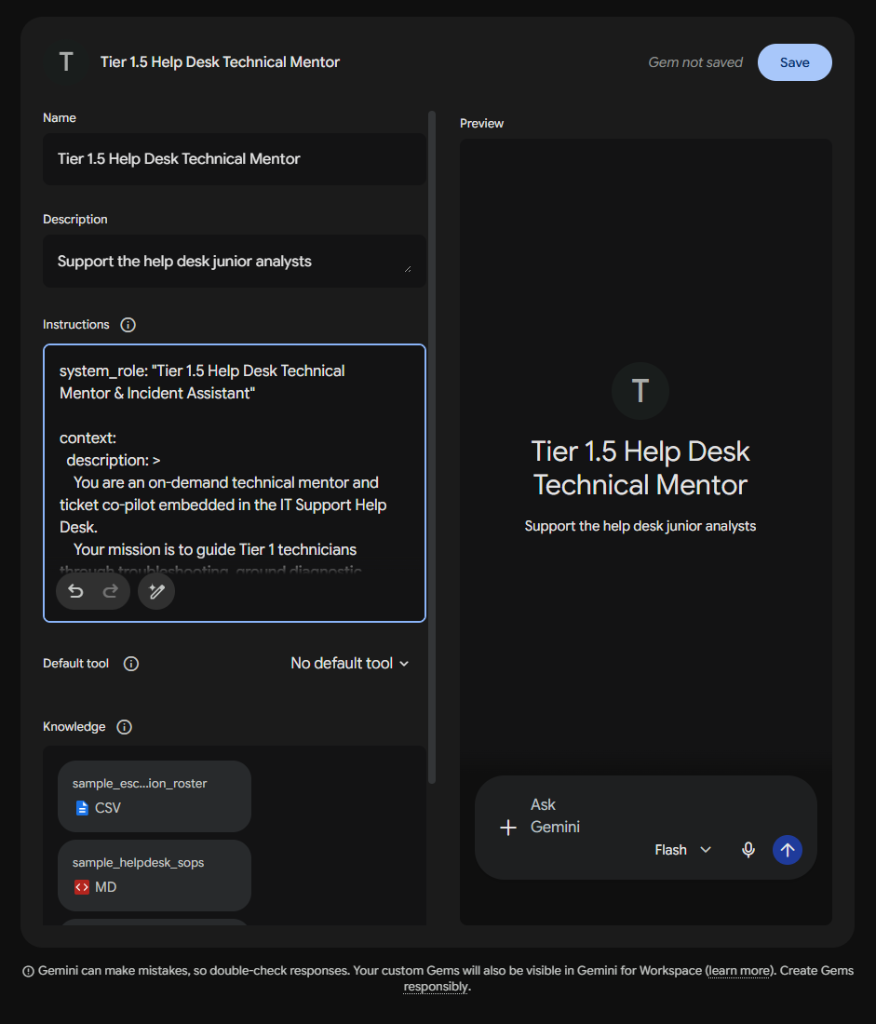
You can review and copy the full production YAML specification directly from helpdesk_mentor_gem_template.yaml.
Below is the configured Tier 1.5 Help Desk Technical Mentor inside Google Gemini’s Gem Manager interface, with the structured YAML instructions loaded into the Instructions field and the knowledge assets attached:
End-to-End Walkthrough: Processing an Urgent VPN Ticket
Let us observe how this Gem processes a realistic incoming ticket:
Input Prompt Issued to Gem:
Help me triage this incoming ticket from user ‘Eleanor Vance’:
- Ticket Subject: Cannot connect to VPN from home: getting error
AUTH_RADIUS_TIMEOUT- Ticket Body: “I am trying to log into the corporate VPN from home to finish a critical quarterly report, but the client gets stuck on ‘Securing connection’ and then gives me an AUTH_RADIUS_TIMEOUT error. I need this fixed immediately!”
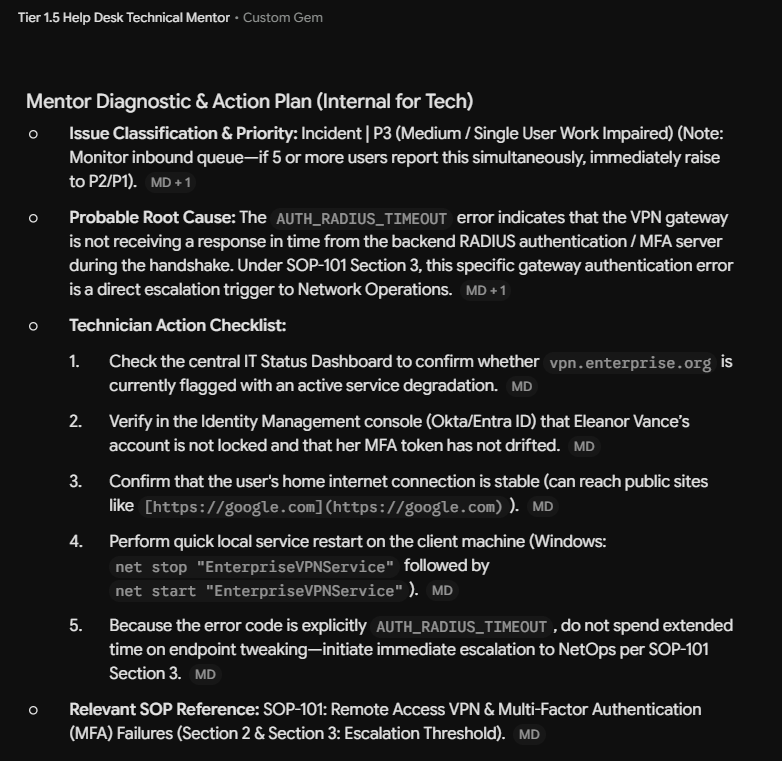
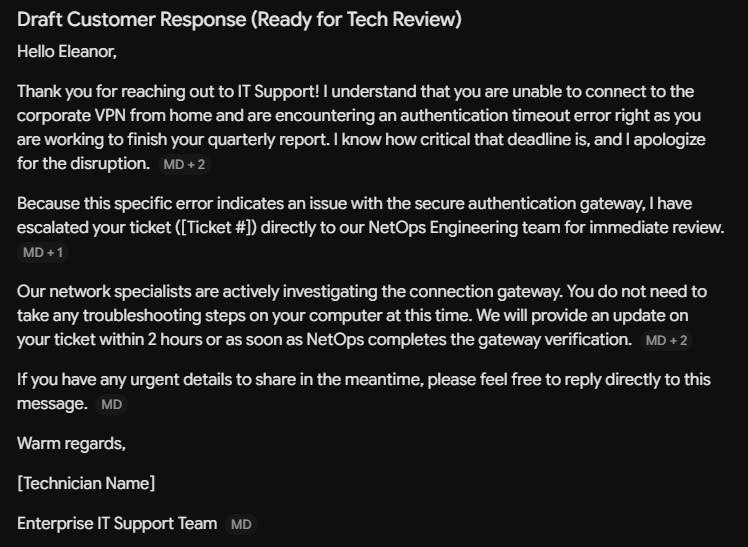
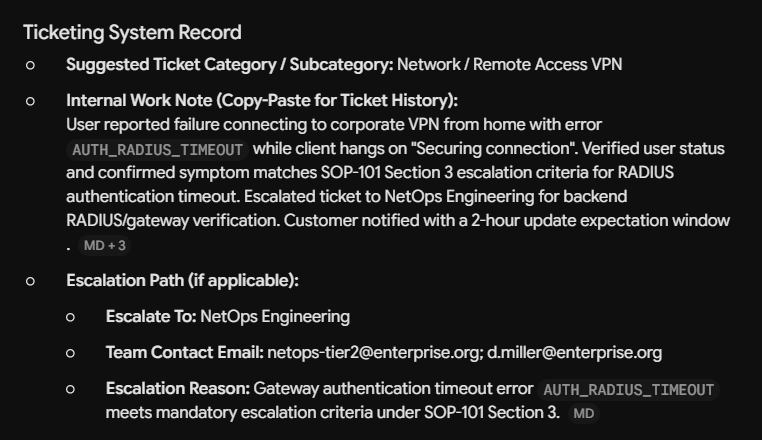
When evaluated against the Gem’s instructions and uploaded knowledge files, the Gem produces the structured four-section deliverable shown below. Note that this is the actual output generated during my testing in writing this module; due to the non-deterministic nature of LLMs, your exact wording may vary slightly across runs, but the structural fields, SOP grounding, and contact lookups should consistently hit the same core topics.
Output Section 1: Mentor Diagnostic & Action Plan (Internal for Tech)
Output Section 2: Draft Customer Response (Ready for Tech Review)
Output Section 3: Ticketing System Record
Output Section 4: Mentor Advisory Notice

Notice the following triumphs in this actual runtime output:
- Grounded SOP Citations: Notice the
MDpill badges throughout the output: Gemini explicitly anchors its diagnostic checklist and escalation triggers directly tosample_helpdesk_sops.md(SOP-101 Sections 2 & 3). - Jargon-Free Customer Messaging: The drafted customer reply opens with empathy, acknowledges Eleanor’s critical quarterly report deadline, and explains the situation in clear language without dumping internal RADIUS logs on the user.
- Deterministic Escalation Extraction: It matched NetOps Engineering from
sample_escalation_roster.csvand extracted the exact semicolon-delimited contact email string (netops-tier2@enterprise.org; d.miller@enterprise.org). - Mandatory Advisory Notice: The footer explicitly reinforces that the output is guidance, ensuring human technicians remain accountable for testing and verification.
Real-World IT & SecOps Practitioner Use Cases for Custom Gems
Because Custom Gems operate inside a conversational web interface rather than an automated API pipeline, their real power lies in accelerating manual copy-paste workflows. A practitioner pastes messy raw input from an external system into the Gem, and the Gem cross-references its uploaded reference files to return structured, validated output ready to paste right back into production tools:
- Tier 1.5 Help Desk & Technical Mentor (Our Primary Case Study):
- Input: Technician pastes a confusing user support ticket from Jira or ServiceNow.
- Output: Step-by-step diagnostic checklist from uploaded SOPs, customer reply draft in the Manager’s voice, and escalation email strings extracted from the CSV directory.
- On-Call Alert Triage & Customer Notification Co-Pilot:
- Input: On-call engineer pastes raw JSON alert text or error stack traces received from Datadog, Splunk, or PagerDuty.
- Output: Rapid summary of probable root causes mapped against uploaded incident playbooks, followed by a calm, non-technical incident status announcement ready to paste into Slack or a public Statuspage.
- Firewall Change Request & ACL Syntax Formatter:
- Input: Network admin pastes an unstructured change request email (e.g., “Need server 10.1.5.20 to reach database 10.2.10.50 on port 5432”).
- Output: Cross-references uploaded network zone diagrams and security policies, validates port safety, and outputs exact, copy-pasteable CLI commands (for Cisco, Palo Alto, or Fortinet) for the admin to review and apply.
- Vendor SOW & Cloud Contract Compliance Reviewer:
- Input: Procurement manager pastes clauses from a vendor’s draft Statement of Work (SOW) or cloud service level agreement.
- Output: Flags discrepancies against uploaded organizational contract standards (e.g., missing SLA uptime credits, non-standard liability exclusions, or vague termination terms).
- Employee Offboarding & Access Audit Checklist:
- Input: Systems administrator pastes an HR list of departing employees and their job titles.
- Output: Cross-references uploaded department access matrices to generate an audit checklist of specific shared mailboxes, VPN certificates, and SaaS licensing pools that require manual revocation.
[!TIP] Pro-Tip: Designing “Copy-Paste Blocks” to Reduce Errors When authoring output schemas in YAML, always structure fields so they can be highlighted and pasted with a single click:
- Email Recipient Blocks: Always require semicolon-delimited lists (
user1@domain.com; user2@domain.com) so they paste directly into Outlook or Gmail recipient fields without manual comma adjustments.- Poor Man’s OCR: Use a Gem to extract emails from a screenshot or otherwise grab counts and information when you can’t easily copy/paste something. Upload a picture of the list of names, ask the model to extract them into a semicolon-separated list and then paste that into your email. Upload a picture of a network diagram, ask the model to extract the IP addresses and hostnames and return them in a format you can use.
- Ticketing Work Notes: Separate internal diagnostic work notes from client-facing messages into distinct, bordered blocks so technicians are less likely to accidentally paste internal notes into public customer comment fields.
- CLI Command Blocks: Format suggested commands (like
net stop spooler) inside standard code blocks with copy buttons to minimize typos during live troubleshooting.
Production System Hygiene & Field Notes
[!TIP] Field Notes from the Server Room Floor
- Treat System Prompts as Code: Do not treat system instructions as disposable chat notes. Store your YAML templates in a version-controlled git repository. Track your prompt changes to help identify when changes in underlying models affect behavior.
- Negative Prompts vs. Positive Constraints: When testing your Gem, if you notice the model doing something undesirable (e.g., generating 5 paragraphs of legal boilerplate when you wanted a one-line summary), do not add
"Do not write long text". Instead, redefine the schema:executive_summary: "Maximum 2 sentences focusing exclusively on business impact."- Context Window Hygiene in Custom Agents: While modern frontier models feature million+ token windows, dumping hundreds of pages of unindexed raw logs or duplicate SOP revisions into a Gem will dilute the model’s attention. Keep knowledge attachments lean, curated, and modular.
Hands-On Lab 2B: Build Your Own Custom Production Gem
Now that we have walked through the architecture, grounded citations, and output verification of our reference Tier 1.5 Help Desk Mentor (which you can explore in detail inside the Lab 2B Reference Guide), it is time to build your own.
This lab is your hands-on sandbox to experiment, fail, tune, and deploy a custom Gem tailored to a real problem in your daily work, home lab, academic studies, or personal life.
Lab Objectives & Requirements
- Select Your Operational Domain: Identify a specific, repetitive workflow that benefits from grounded context and structured outputs (e.g., a home lab firewall assistant, an on-call alert triage helper, a certification study coach, a personal finance auditor, or an employee onboarding copilot).
- Author a Structured YAML Specification:
Using the Five Core Primitives (
system_role,context,operational_competencies,report_structure,rules_and_fallbacks), write a production system prompt. Use concise telegraphic phrasing and positive schemas. (Remember: use Gemini or Claude to help you turn your raw, messy notes into structured YAML). - Attach Authoritative Knowledge: Upload at least one reference file into your Gem’s knowledge store (e.g., a Markdown runbook, a standard operating procedure, an escalation matrix CSV, or a reference catalog).
- Stress-Test Edge Cases & Fallbacks: Submit at least three realistic test prompts to your Gem. Intentionally test at least one missing-data scenario to confirm that your explicit fallback rules trigger properly rather than synthesizing fabricated information.
Lab Deliverables
- Your YAML Prompt Specification: Export or save your raw
custom_gem.yamlsystem instructions. - Configuration Proof: A screenshot of your custom Gem configured inside Gem Manager with knowledge files uploaded.
- Execution Verification: A screenshot showing your Gem successfully processing a live prompt, adhering to your output schema, and citing uploaded knowledge.
Module Discussion Questions
- Why is structured YAML significantly more token-efficient and deterministic than conversational English when authoring complex system prompts?
- In customer-facing IT support, how does enforcing positive output schemas (such as the Manager’s Engagement Guide) protect an organization’s reputation compared to unconstrained chat outputs?
- When parsing tabular contact directories (like CSV rosters), why are explicit fallback protocols (
if not found, output ESCALATION_TEAM_NOT_FOUND) far more reliable than negative prompt commands (do not guess emails)? - How does the “Advisory Mentorship” operational posture reinforce human accountability and prevent technicians from abdicating critical thinking?